
Boho Terracotta Save the Date Website Template


Boho Terracotta Save the Date Website Template
Boho Terracotta Save the Date — an earthy Canva wedding website template, designed in-house, with a built-in RSVP, in terracotta, dusty rose, and dried florals.
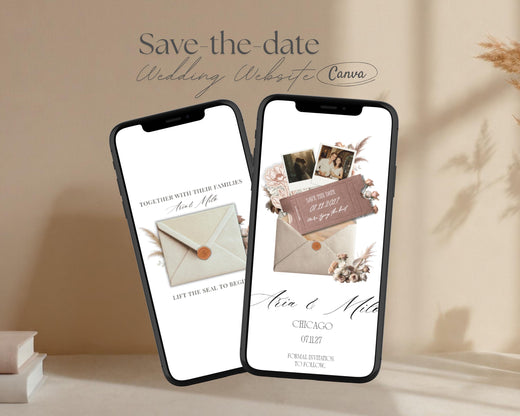
Picture this: your guests tap open a warm envelope and find pampas grass, dusty rose accents, and desert-toned florals around your details.
This 3-page mini wedding website collects names and mailing addresses while setting the tone for your boho, desert, or barn celebration.
Warm. Earthy. Refined.
Luxury look. Fully DIY. No coding required.
🎁 INCLUDED WITH EVERY ORDER
Every order comes with the studio's Cocktail & Drinks illustrations (all 50 of them!) plus a ready-to-edit Drinks Menu template — free. Use them to style your signature bar, a his-and-hers cocktail menu, or sweet little drink signs in minutes. No extra cost — a thank-you from the studio for being here. 🤍
💌 NEW TO THIS? YOU'VE GOT THIS —
✓ No design experience needed — if you can type, you can edit this. (If you can use Instagram, you can use this.)
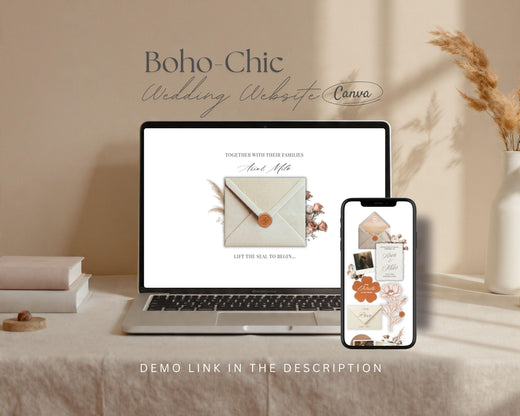
✓ Looks beautiful on phones — your guests open your site and RSVP right from their mobile. No app, no login.
✓ Built-in RSVP collects every reply for you automatically — no separate tool, no Google Form juggling.
✓ Instant access — your template link arrives the moment you buy.
✓ Stuck at any point? The designer replies personally, usually within a few hours. You're never on your own. 🤍
Easy Aisle Studio designs original Canva wedding websites in-house. The florals, envelopes, wax seals and crests in this design are drawn for the studio — not licensed stock, not a resold template — which is why this look doesn't turn up anywhere else.
1,000+ orders · Designed and supported by Sara.
THIS ONE'S FOR YOU IF YOU'RE...
✨ Planning a boho, desert, barn, or laid-back modern wedding
✨ In love with terracotta, rust, sand, blush, and dried florals
✨ Wanting guests to tap an envelope and "open" the save the date
✨ Collecting mailing addresses without the clunky Google Form energy
✨ Matching it to the full Boho Terracotta wedding website (sold separately)
Think golden hour, pampas grass, and soft candlelight.
💘 BUILT-IN RSVP FORM (YES, REALLY)
No apps. No redirects. No asking guests to "click here and fill out this other thing."
Your RSVP is built right into the website using Canva's native forms. Guests type their info, hit submit, done.
- Guests fill it out right on your save the date page — no Canva account needed
- Responses save automatically in Canva (Forms → Responses → Canva Sheets)
- You get your own private response sheet — check it anytime (names + mailing addresses)
Setup takes a few minutes, and step-by-step instructions are included.
💘 SEE IT IN ACTION
👉 Live demo: https://easyaislestudio.my.canva.site/save-the-date-boho-chic
(Looks great on any device — phone, tablet, or computer.)
💘 WHAT'S INCLUDED (INSTANT DOWNLOAD)
✔ Boho Terracotta Save the Date Canva website template
✔ 3 scrolling pages: Welcome · Save the Date · RSVP
✔ Built-in Canva RSVP form (collects names + mailing addresses)
✔ PDF Quick Start guide with a full setup walk-through
✔ Beginner-friendly Canva setup instructions (even if you've never opened Canva)
🆓 Works with a free Canva account
🆓 Publish with Canva's free website link
✨ Optional custom domain (a Canva Pro feature)
No downloads. No coding. No tech stress.
💘 HOW IT WORKS
1️⃣ Purchase & download — you'll get a PDF with your template link and setup guide.
2️⃣ Open in Canva — click "Use template" and it saves your own editable copy automatically.
3️⃣ Make it yours — swap in your names, date, and details, upload your photos, adjust colors and wording.
4️⃣ Set up your RSVP — the form's already built in; just tweak the questions if you'd like. Responses save to Canva Sheets.
5️⃣ Publish & share — hit publish, Canva gives you a shareable link, and you can text it, email it, share it on WhatsApp, or print it as a QR code on your printed cards.
Done in under an hour. Impressive for a lifetime.
💘 THE PAGES
✨ Envelope entrance — terracotta and sand tones with pampas and dried-floral accents
✨ Save the date landing — your details in terracotta, cream, and soft neutrals, with room for photos
✨ RSVP page — clean layout with terracotta accents and the built-in Canva form
Duplicate, remove, or reorder any page anytime.
💘 FULLY CUSTOMIZABLE (LIKE, ACTUALLY)
🎨 Edit all wording, button text, and headlines
🎨 Replace photos and background images
🎨 Recolor text, shapes, and backgrounds — terracotta, rust, sand, blush, sage, or go rogue
🎨 Choose from Canva's huge free font library
A note on the artwork: the florals, envelopes, wax seals, and similar elements are drawn in-house for this studio — not from Canva's stock library — so this look is unique to these designs. Because they're original artwork, their colors are set per colorway and don't recolor the way text and shapes do. You can still swap or remove them, and new colorways are added regularly — so if you have a specific look in mind, just reach out and the studio will let you know what's possible. 🤍
If you can use Instagram, you can use this. It's drag-and-drop, start to finish.
💘 GOOD TO KNOW (A FEW HONEST TIPS)
🤍 Your published site looks perfect on phones, tablets, and computers — that's how most guests will open it. When it's your turn to edit, a computer just gives you more room to work (you can preview on your phone anytime).
🤍 Pick your site link name carefully — your free Canva web address starts with a fixed prefix tied to your account that can't be changed. You do choose the last part (your site name), so pick it with care. Want to change the ending later? Just republish as a new site and choose a new one.
🤍 Send yourself one test RSVP before you share the link — peace of mind before it goes out to everyone.
QUESTIONS, ANSWERED.
Do I need Canva Pro?
Nope — works perfectly with free Canva.
Do my guests need a Canva account to RSVP?
No. They just type and submit, like any other form.
Where do RSVP responses go?
Straight to your Canva account (Forms → Responses → Canva Sheets). No mystery, no hassle.
Can I change the colors and fonts?
Yes — all text, shapes, backgrounds, and fonts are fully editable. The custom elements drawn in-house for this studio (florals, envelopes, wax seals) have set colors per colorway, but you can swap or remove them — and new colorways are added regularly, so just reach out if you have a specific look in mind.
Is this a physical product?
No, it's a digital template. You'll get your download link right after purchase.
Can I connect my own domain (like ourwedding.com)?
Yes! You'll need Canva Pro and may need to buy a domain separately, but it's totally doable.
Can I link this to my Zola or The Knot site?
They're separate platforms, so they don't merge — but lots of couples link their Zola, The Knot, or With Joy page to this site (or link this RSVP/details page from theirs), so guests get everything in one pretty place.
Can I make different versions for different guests?
Yes — just duplicate your site in Canva and tweak each one. A free Canva account publishes up to 5 sites; Canva Pro is unlimited.
Can I change the language?
Absolutely — use Canva's built-in translator, switch your account language, or paste in your own translated text. You can even publish multiple language versions.
Can I add music?
Honestly? Best skipped. Canva websites have no built-in music player — the only way is to paste a third-party HTML embed (a widget like Common Ninja) into a Code element, which can play an uploaded MP3 or pull from YouTube, Vimeo, or SoundCloud. It works, but it pulls in an outside tool, most browsers block audio from auto-playing so guests have to tap play anyway, and it can slow your page down. For a clean, fast site, leave it off.
What if I get stuck?
Message the studio anytime — the designer is always happy to help. 🤍
Will it look good on phones?
Yes — your published website is built to look great on phones, tablets, and computers, and your phone is exactly where most guests will open it and RSVP. (Editing is easiest on a desktop, but you can preview on mobile anytime.)
Can I use this for a multi-day or weekend wedding?
Yes — add or duplicate pages for a welcome party, rehearsal dinner, or day-two brunch, so your whole weekend lives in one place.
LICENSE & TERMS
• Digital product only — nothing physical is shipped.
• Personal use, one wedding (yours) — not for client work or resale.
• The design stays with the studio. You're licensed to use it for your own event only — not to resell, share, redistribute, or use it (or any included assets) to build templates or products of your own.
• Claiming this design as your own, or using any part of it to create derivative or competing templates, is strictly prohibited.
• All sales are final (it's an instant digital download).
• Designed for Canva — not compatible with Zola, The Knot, Wix, or similar platforms.
• Infringement is taken seriously. Any resale, redistribution, or copyright abuse will result in revoked access, takedown requests, and reporting to the relevant platforms.
• These designs are registered and timestamped with an independent third-party copyright registry — authorship and the all-rights-reserved license are on record.
By purchasing, you agree to these terms.
© EasyAisleStudio — All rights reserved. Registered & protected.
Original Canva wedding websites, designed in-house — for couples who want the anti-DIY look.
Need the full site? The matching Boho Terracotta 5-page wedding website is in the shop.
“I was so happy to find this beautiful template for our big day! Super easy to download, use, and even tweak to feel custom to our theme — we’ve gotten so many compliments. 10/10.”
“Worth every penny! I made my whole site in under 10 minutes. The template is amazing, and the owner is so helpful if you run into any challenges.”
“Amazing design — I’m so happy I found this for my wedding. I had a question at 5:30am and got a response within minutes. Highly recommend.”
“Designing was easy and smooth thanks to the detailed instructions. I absolutely loved the result of my invitation!”
“So easy to navigate and customize. We’ve gotten so many compliments on the creativeness — and it saved us a huge wedding cost.”
“Exactly what we were looking for! My fiancée loved all the customizable options — the fonts, the photos, the colours.”
“The template is beautiful and elegant, and so easy to use. Everything felt clear and intuitive from the very start.”
“So easy to use, and the few questions I had were answered so quickly that everything felt clear and simple.”
“I could not be happier! I loved how our save-the-dates turned out, and the customer service was amazing — so quick to help.”
Pair it with a matching Wedding Website
Designed to complement this template perfectly.
Made to match
Complete the Suite
Create a seamless first impression from save the date to wedding website with a coordinating design made to feel beautifully connected.
Included in your matching set
frequently asked questions
Don’t see your question? Message me any time — I answer my own chat.
Is this a ready-made website, or do I build it myself?
A little of both — and in the nicest way. The design, layout and wording are already done; you personalise by swapping in your details in Canva. Most couples finish in an evening.
Do I need Canva Pro?
No, lovely — everything works with the free version of Canva. Pro is only needed for custom domains or premium stock photos, neither of which you need.
I’ve never used Canva and I’m not “a design person.” Can I still do this?
Yes — truly. If you can drag, drop and type, you can do this. The guide gives click-by-click instructions for beginners.
How does the RSVP work — do my guests need a Canva account?
No account needed. Once your site is published, anyone with the link can view it and submit the RSVP form — no logins, no apps, no redirects.
What if I get stuck — how fast will you reply?
Quickly. I’m a real person, not a help desk or a chatbot, and I answer my own messages, Monday–Friday, 8am–6pm EST.
Can I change the colours and fonts?
Text, wording and fonts are fully editable, along with many of the design elements. Floral and envelope artwork are image-based, so dramatic colour changes may not look natural.
How long does my website stay live?
As long as you want it to. There’s no expiration — once it’s published, it stays live until you decide to take it down.
What’s your refund policy?
Because these are instant digital downloads, all sales are final — so if you’re unsure whether a template is the right fit, please message me before you buy.